

Close Menu
TIMES24H – International Breaking News
    Facebook X (Twitter) Instagram
    Facebook X (Twitter) Instagram
    TIMES24H – International Breaking News
    • Hot!
      • Vietnam
      • Asia
      • Video
    • World
      • PR Newswire
      • Media OutReach Newswire
      • GLOBENEWSWIRE
    • Business
    • Life
      • Lifestyle
      • Recipes
      • Fashion
    • Sport
    • Tech
      • Gadgets
    Media Outreach Newswire
    TIMES24H – International Breaking News
    Home»Gadgets»Google: Android ‘Find My Device’ App Rumors Bluetooth Functions Coming Soon
    Gadgets

    Google: Android ‘Find My Device’ App Rumors Bluetooth Functions Coming Soon

    Mike HarrisonBy Mike HarrisonJune 19, 2021No Comments3 Mins Read
    Facebook Twitter Pinterest LinkedIn Tumblr Email
    Share
    Facebook Twitter LinkedIn Pinterest Email

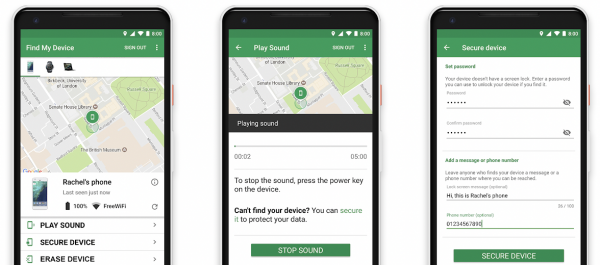
    Google’s Android operating system will soon add functions and connections of Bluetooth for its “Find My Device” application that would serve as a lost function for the device. 
    Google Find My Device

    (Photo : Google Play Store)

    Instead of merely giving users GPS and internet connectivity for locating their lost devices using the application from Google for Androids, they would soon get Bluetooth connections for stronger detection. This would expand the current services of Android, especially with their application that also serves as a precautionary feature for its devices.

    Apple was known best for its Find My applications which have been around since the early beginnings of the devices, released on its initial releases. Moreover, the feature has been effective for iOS users, and Google’s Android should also have this, for added security and protection for the loss or theft of mobile devices and tablets. 

    Read Also: Google Pixel Buds A-Series: Is the Device Under $100 Worth It? Specs, Where to Buy, and MORE

    Google’s Android Find My Device Application, Bluetooth Function

    Google Find My Device

    (Photo : Google Play Store)

    Earlier this month, Google has been reported to be working on a “Find My” device application and said that it would resemble that of the iOS and Apple. This is a massive development for Android devices, especially for its long-running stint that has not much of the device locating application, despite being massive in the industry and widely used.

    The earliest iterations of a Find My for Androids came from each smartphone brands’ creation for their own devices, but are not interconnected under the Android environment. This means that users either need the same device brand’s smartphone to locate one’s lost device or use a separate web browser to locate the device, like that of Samsung’s Find My Mobile. 

    The app that Google is developing is under its laboratories, and would soon add a Bluetooth function that would further the effectiveness of finding said device. This was through 9 to 5 Google’s discovery of the API called “Spot,” which signifies the adoption of Bluetooth into the service, and the help of the app to bring detection into Google’s services. 

    Doesn’t Android Have a ‘Find My Device’ Already?

    Google Find My Device

    (Photo : Google )

    Google has a “Find My Device” application on its website, but it is limited to devices that are logged into their Google accounts but are only limited to the browser. The upcoming app would ensure its availability to be a stronger version to find lost devices, especially as it would have the proper access and permissions to a device’s GPS settings and other factors. 

    While this application is already effective in locating an Android device, a dedicated app could help further its capabilities, and with what Google is working on, it could unlock something that lines up with Apple’s app.

    Related Article: Google Messages v8.3.026 New Feature | Pin Up to 3 Conversations to the Top

    This article is owned by Tech Times

    Written by Isaiah Richard

    ⓒ 2021 TECHTIMES.com All rights reserved. Do not reproduce without permission.



    TechTimes

    Share. Facebook Twitter Pinterest LinkedIn Tumblr Email

    Related Posts

    AI Riser Vietnam 2026

    AI Riser Vietnam 2026: Google showcases 10 Vietnamese-built AI projects at Ho Chi Minh City forum

    October 8, 2026
    NordLocker rebuilds its encrypted cloud storage from the ground up

    NordLocker rebuilds its encrypted cloud storage from the ground up

    July 10, 2026
    Google Cloud Security Uses Instruqt Platform to Train 150+ Practitioners on Agentic AI at Google Next 2026

    Google Cloud Security Uses Instruqt Platform to Train 150+ Practitioners on Agentic AI at Google Next 2026

    May 24, 2026
    Leave A Reply Cancel Reply

    Latest News
    Le Méridien Khao Lak Resort & Spa Invites Guests to Discover a Coastal Escape with the Khao Lak Stay and Dine Package

    Le Méridien Khao Lak Resort & Spa Invites Guests to Discover a Coastal Escape with the Khao Lak Stay and Dine Package

    October 27, 2026

    Le Méridien Khao Lak Resort & Spa Invites Guests to Discover a Coastal Escape with the Khao Lak Stay and Dine Package

    October 27, 2026
    Omnichat Raises US$10M Series A Led by Openspace Capital to Scale AI Agent Platform and Drive Global Expansion

    Omnichat Raises US$10M Series A Led by Openspace Capital to Scale AI Agent Platform and Drive Global Expansion

    October 27, 2026
    Executives from Shopify, JLL and Groupe Dynamite Join WareMatch’s Advisory Board

    Executives from Shopify, JLL and Groupe Dynamite Join WareMatch’s Advisory Board

    October 26, 2026
    DMCA.com Protection Status
    Facebook X (Twitter) Instagram Pinterest
    TIMES24H
    Global News · Trusted Information · Clear Perspectives
    TIMES24H is a global news platform delivering timely, reliable, and insightful coverage across technology, business, lifestyle, and current affairs. Our mission is to provide readers with clear perspectives and trusted information to navigate a fast-changing world.
    News & Editorial: news@times24h.com
    © 2026 TIMES24H . All rights reserved.

    Type above and press Enter to search. Press Esc to cancel.